ScanSure AI reads stockist statements into checked secondary sales data
Upload a stockist's stock and sales statement as a PDF or photo and AI reads every row into your product master. Your field team reviews it, managers approve it level by level, and clean secondary sales data flows into reports and your other systems.
What ScanSure does
- AI statement reading
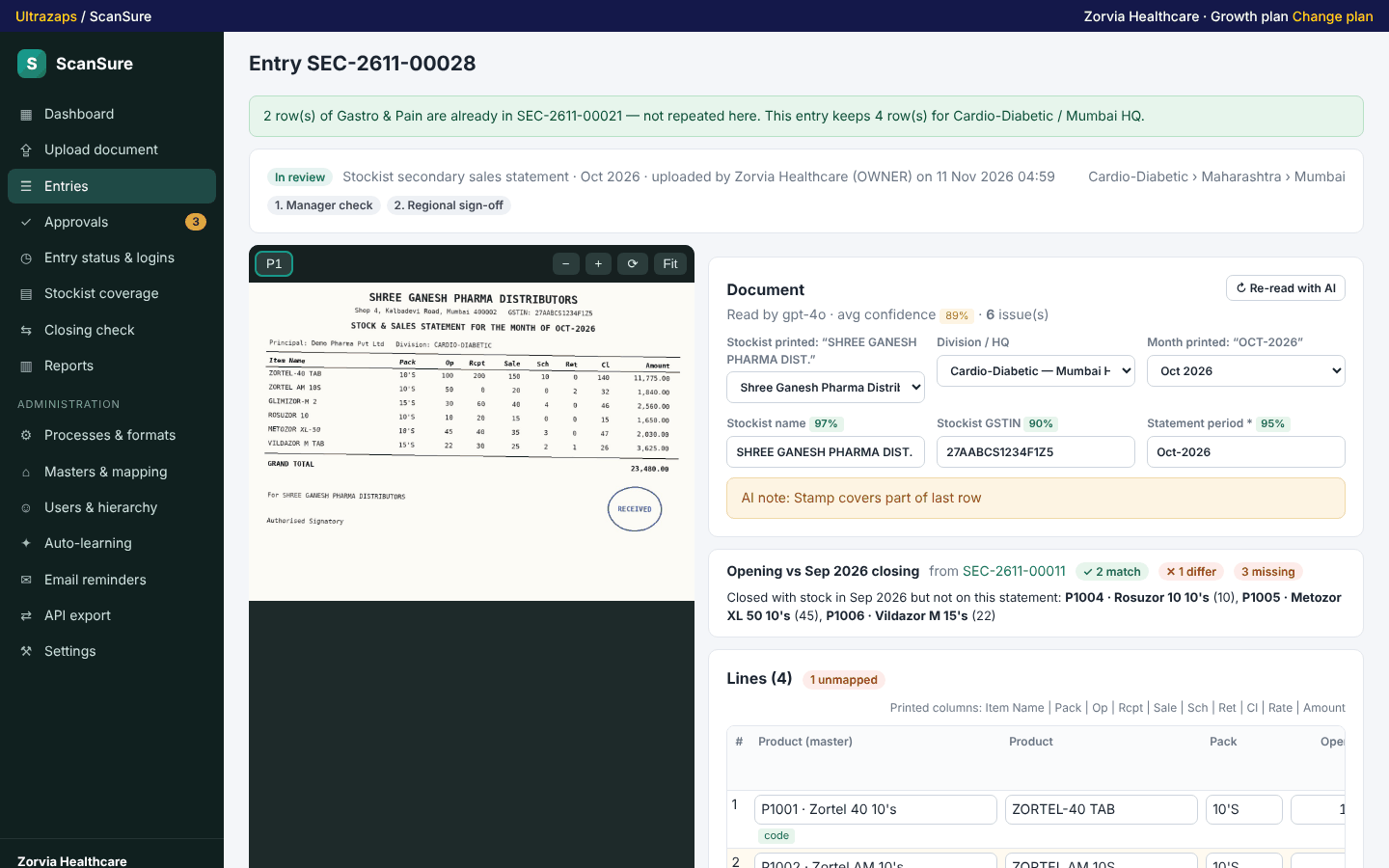
- PDFs and phone photos are read row by row into your format, with a confidence score on every row and the page shown beside the data for review.
- Your own formats
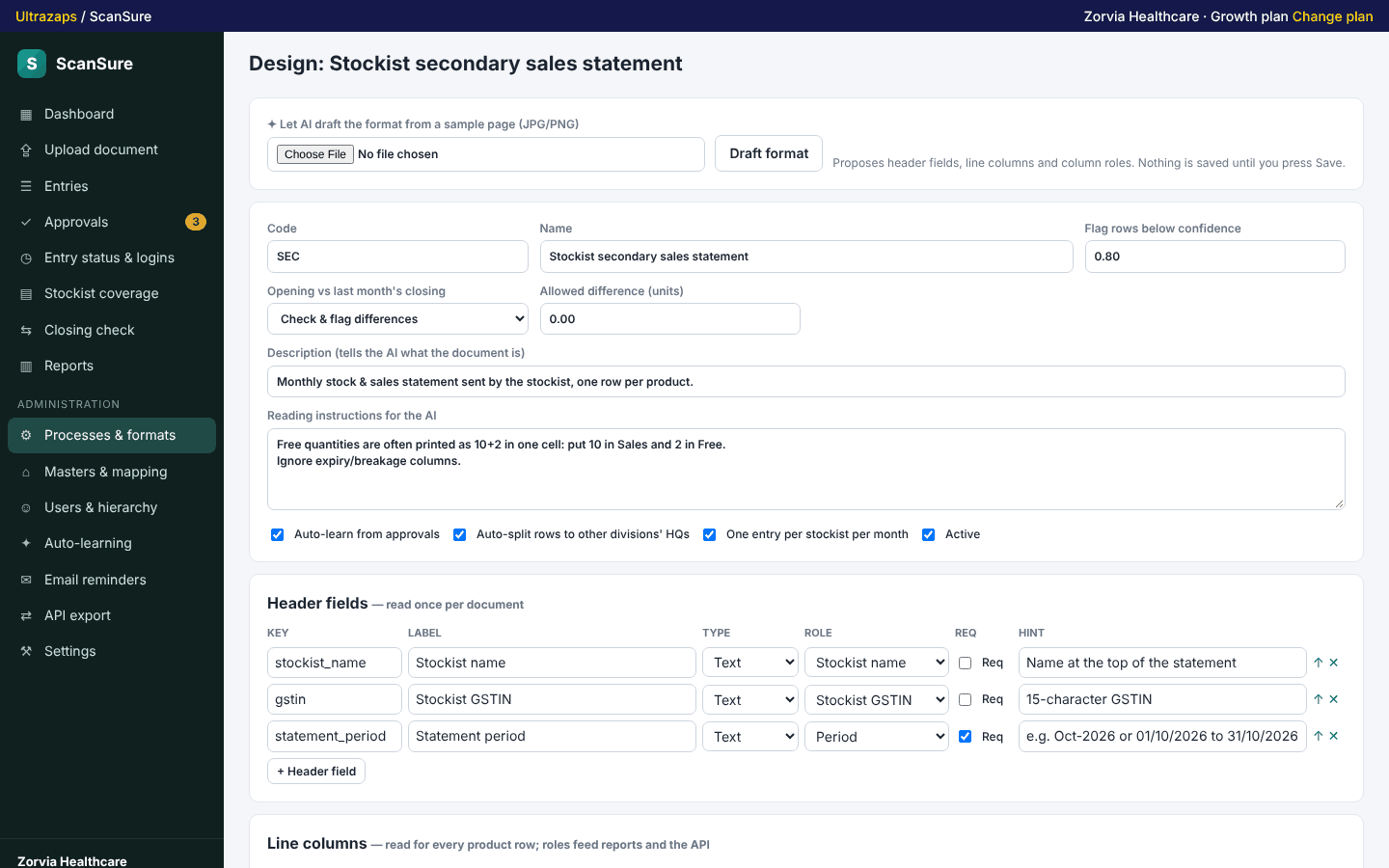
- Design header fields and line columns per document type, or let AI draft the format from a sample page.
- Multi-level approvals
- Any number of approval levels: the uploader's manager, a role in that territory, or a named person, with any-one or all-must-approve rules.
- Learns from corrections
- Product spellings, each stockist's layout and reading rules are learned from approved statements and used on the next upload.
- Division, state and HQ hierarchy
- Team members see and approve only their territory. Stockists map to a different HQ in each division they serve.
- Automatic division split
- A combined statement is split into one entry per division, each routed to that division's HQ and approvers.
- Closing vs opening check
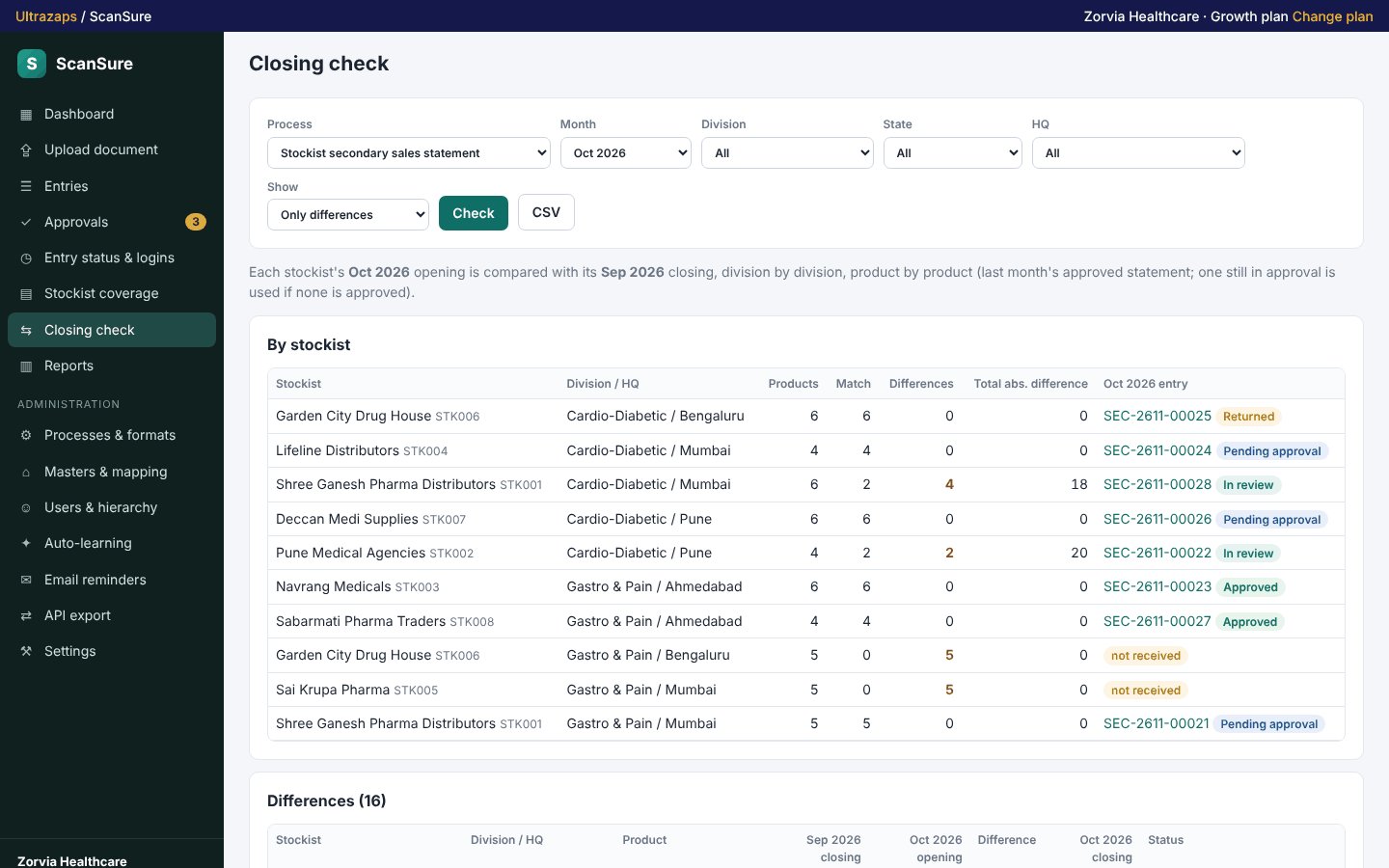
- This month's opening is compared with last month's approved closing for every stockist and product, with differences flagged.
- Coverage and e-mail reminders
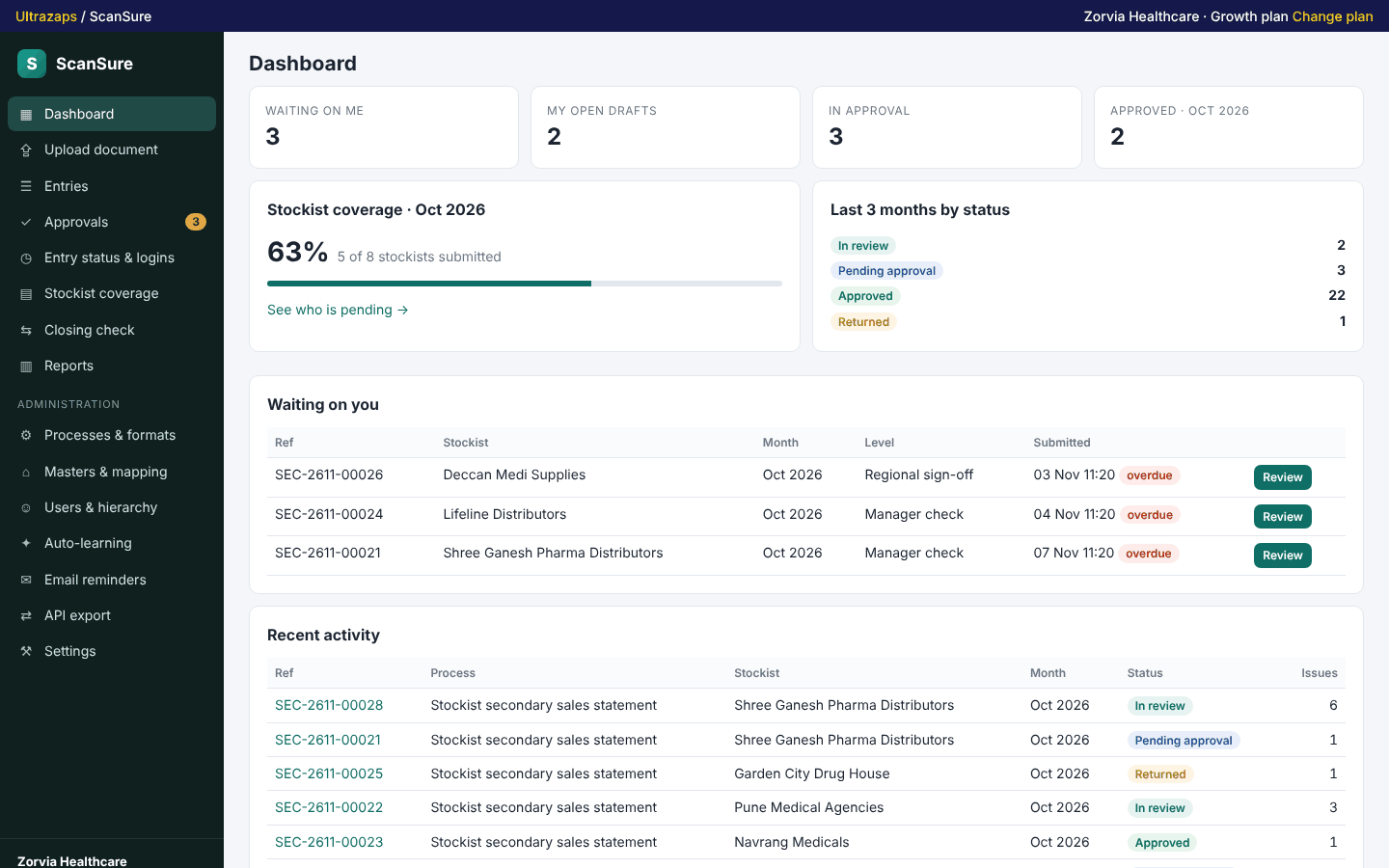
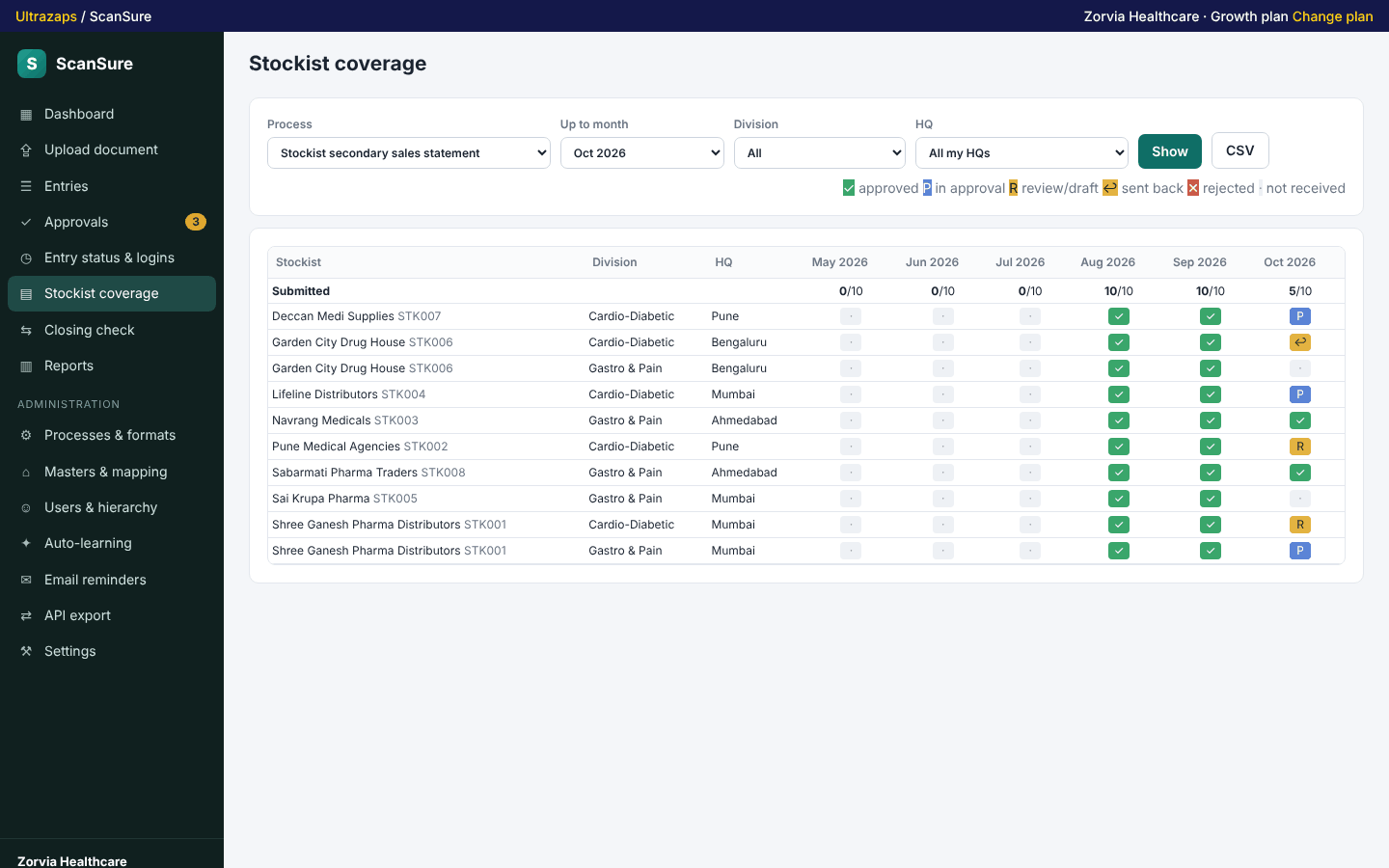
- See which stockists are pending each month and send reminders to admin and state heads after the due date.
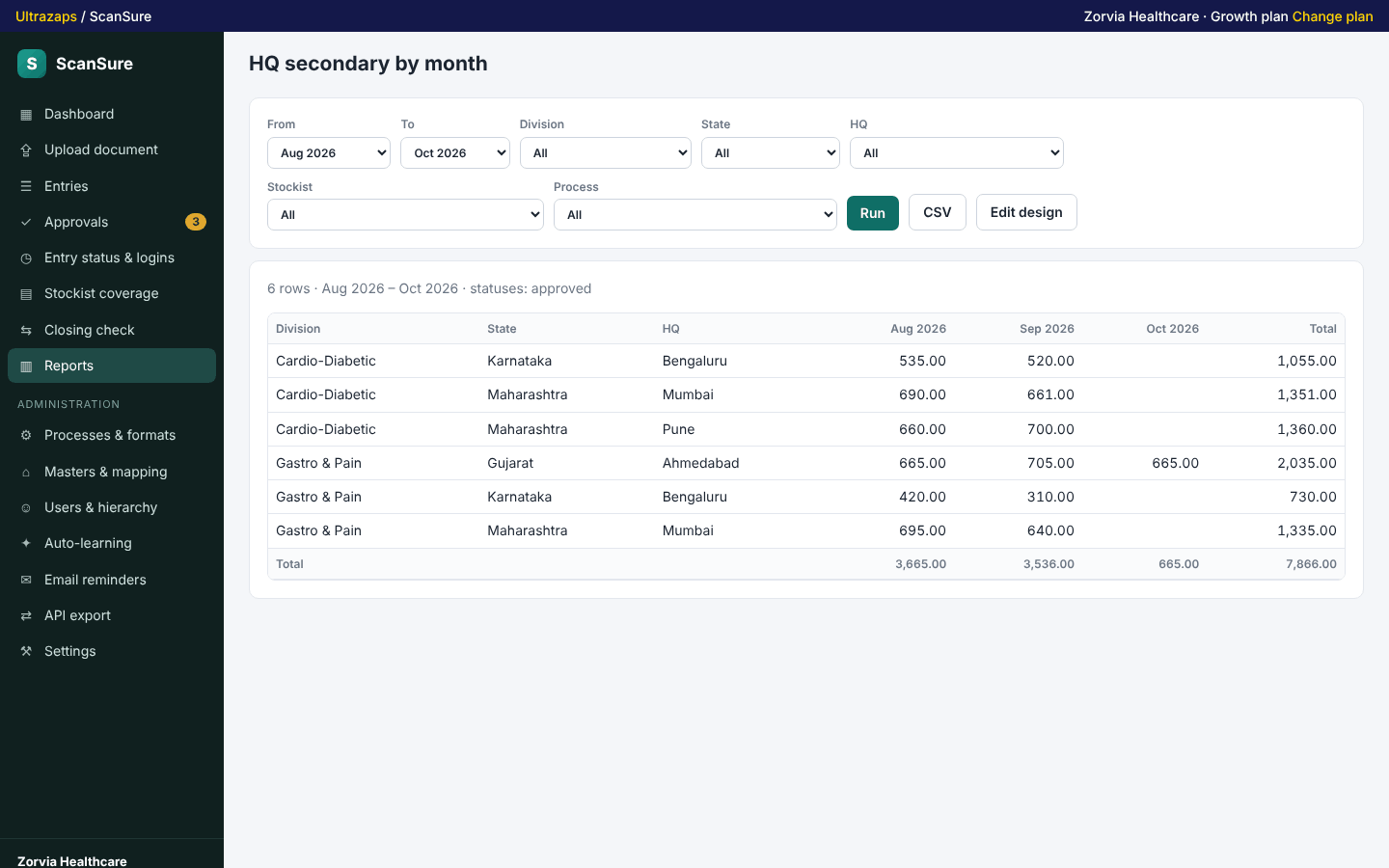
- Configurable reports and CSV
- Build reports by any level with quantities and values, pivot by month and download CSV.
- Export API
- Read-only API keys for secondary data, entries, reports, coverage and masters, restricted to one division if you want.
- Transit and bonus
- Your ERP sends transit and bonus units by API or file. Each statement counts transit dated after its To date up to month end, and bonus inside its From–To period.
- Learns each stockist's columns
- Open balance, Issue qty and Closing balance are read by meaning, never from a Total column. If a column is missed, the reviewer marks it once and every later statement of that stockist uses it.
How it helps
ScanSure is built for pharma and FMCG companies that collect monthly stock and sales statements from stockists. Instead of typing each statement into a sheet, your field staff upload the PDF or a phone photo. AI reads the header and every product row, matches the stockist's own product names to your product master, and checks that opening plus receipts minus sales equals closing. You can look around a sample company first in the live demo: ultrazaps.com/apps/scansure/demo.php
You design the format yourself: which header fields and columns to read, how each column maps to sales, free, returns and closing, and how many approval levels a statement goes through. Approvers can be the uploader's manager, anyone in a role who covers that HQ, or a named person. Every correction a reviewer makes is learned: product spellings, the stockist's layout and reading rules, so the next statement from that stockist comes in cleaner.
The company is organised as divisions, states and HQs, with stockists mapped to the HQ of each division they serve. If one combined statement contains products of two divisions, the rows are split into separate entries for each division's HQ automatically. Each month's opening is cross-checked against last month's closing, a coverage grid shows which stockists are still pending, and e-mail reminders go to admin and state heads after the due date.
Reports are configurable: group by division, state, HQ, stockist, product or month, pick quantities and values, pivot by month and export to CSV. Approved data is also available through a read-only API for your ERP, BI or MIS tools.
Who uses it
- Pharma companies collecting monthly stockist stock and sales statements
- FMCG and consumer health brands tracking secondary sales by distributor
- Sales operations and MIS teams who type statements into spreadsheets today
- Divisions that share stockists but report to different HQs
- Distributors and C&F agents consolidating sub-stockist statements
- Commercial teams reconciling closing stock month to month
Screens
ScanSure plans and limits
Prices in Indian rupees per month. Pay for 12 months and get 2 free. Paid plans do not renew on their own; when one ends, the app returns to free-plan limits and your data stays.
Free
Free
- 25 AI statement reads a month
- 3 team members plus the owner
- Up to 15 active stockists
- Approvals, coverage, closing check and CSV export
Growth
₹999/month
- 400 AI statement reads a month
- 25 team members
- Up to 300 active stockists
- 1 API key for ERP or BI export
- E-mail reminders to admin and state heads
Business
₹1,999/month
- 1,500 AI statement reads a month
- Unlimited team members
- Unlimited stockists
- 5 API keys, each limited to a division if you like
- Everything in Growth
Questions about ScanSure
What does ScanSure cost?
There is a free plan with 25 AI reads a month, 3 team members and 15 stockists. Growth is Rs 999 a month and Business is Rs 1,999 a month for larger teams and more reads. You can pay for 12 months and get them for the price of 10.
Can I try it before uploading my own statements?
Yes. Open the live demo at ultrazaps.com/apps/scansure/demo.php to look around a sample pharma company as admin, state head, area manager or field staff, or load the same sample company into your own free account in one click.
Which documents can it read?
Multi-page PDFs and phone photos or scans in JPG, PNG or WEBP. Printed statements work best; handwriting and stamps are read with lower confidence and flagged for review.
Do my field staff need their own Ultrazaps accounts?
No. You add team members inside ScanSure with an employee code and password, and they sign in on your company's team sign-in page. Your plan sets how many team members you can add.
Can I get my data out?
Yes. Every list and report downloads as CSV, masters export in the same format you import, and Growth and Business plans include API keys for your ERP or BI tool.
Does it work on mobile?
Yes. Field staff can take photos of a statement and upload them from a phone browser; the review and approval screens also work on small screens.
What happens if the AI reads a number wrongly?
Every row can be edited before submission and at approval levels that allow it. The correction is saved and used to read that stockist's next statement better.