Attendwell Daily staff attendance, leave approvals and monthly payable days
Mark your team's attendance in a few taps each day, approve leave, and get a monthly register with payable days ready for payroll. AI writes your monthly attendance summary and drafts replies to leave requests.
What Attendwell does
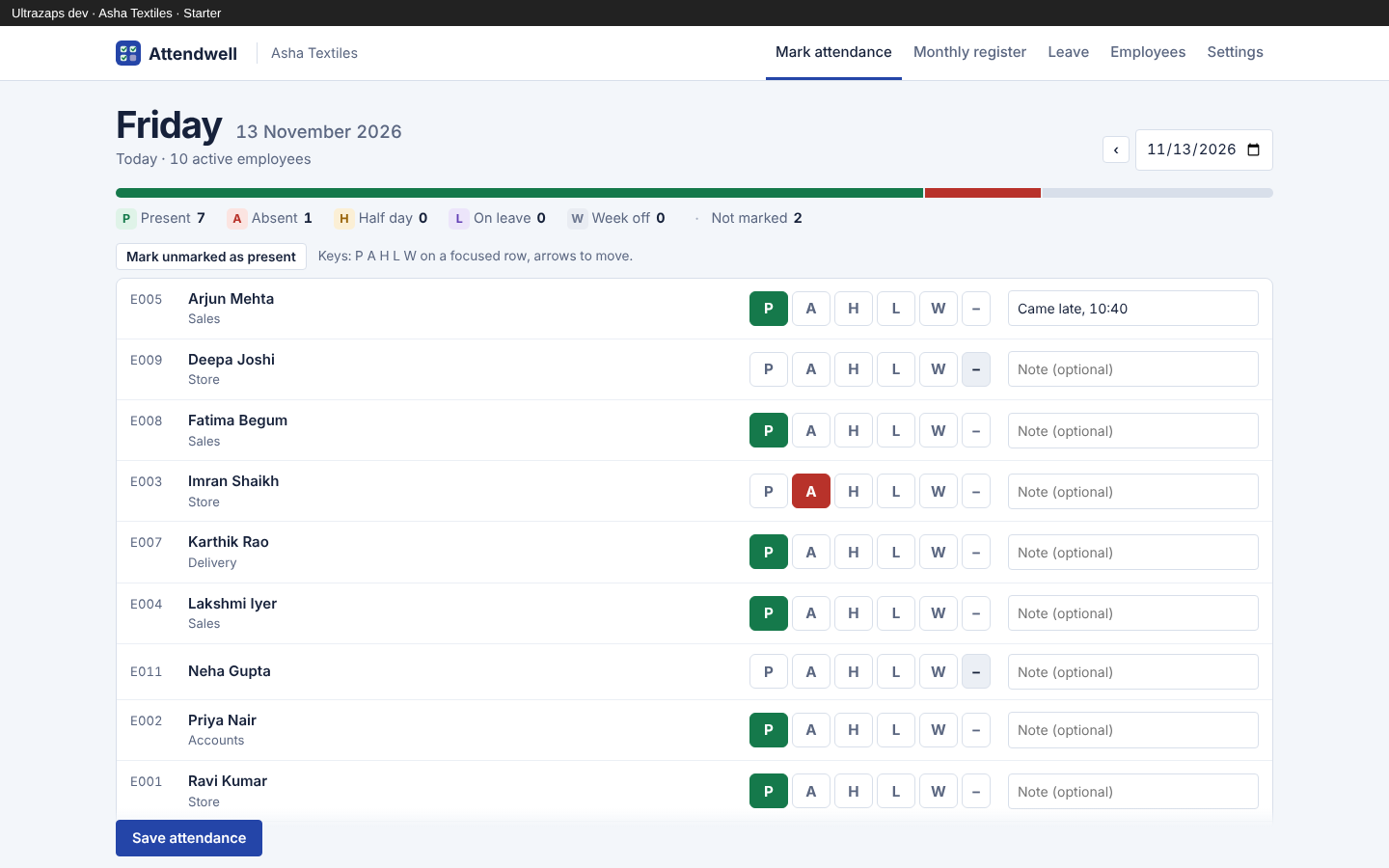
- Fast daily marking
- One row per employee with P, A, H, L and W buttons, optional notes, keyboard shortcuts and a button to mark everyone left as present.
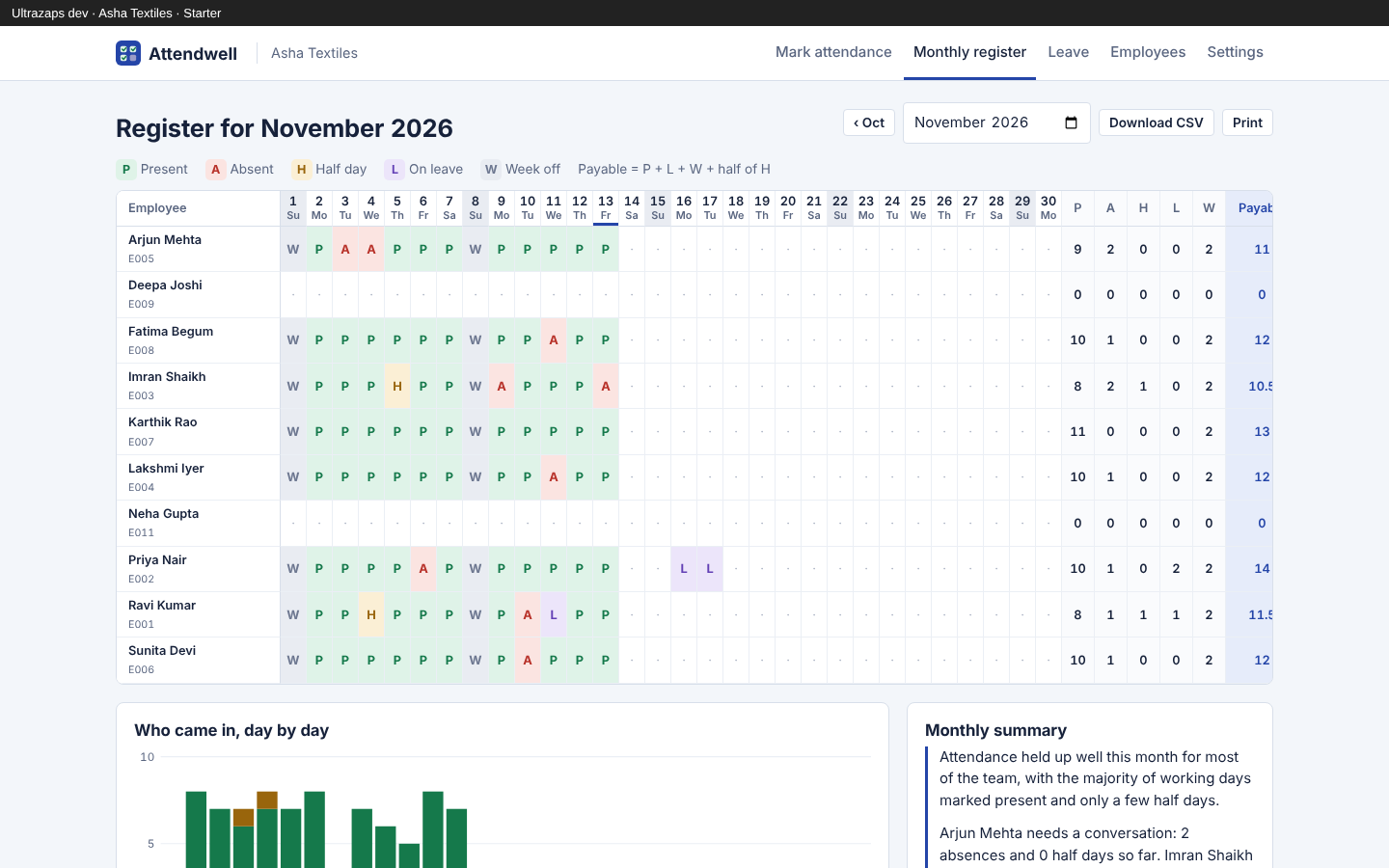
- Monthly register
- All employees and all days of the month on one grid, with weekly offs shaded and notes shown on hover.
- Payable days
- Present, leave and week-off days plus half of half days, totalled per employee for salary calculation.
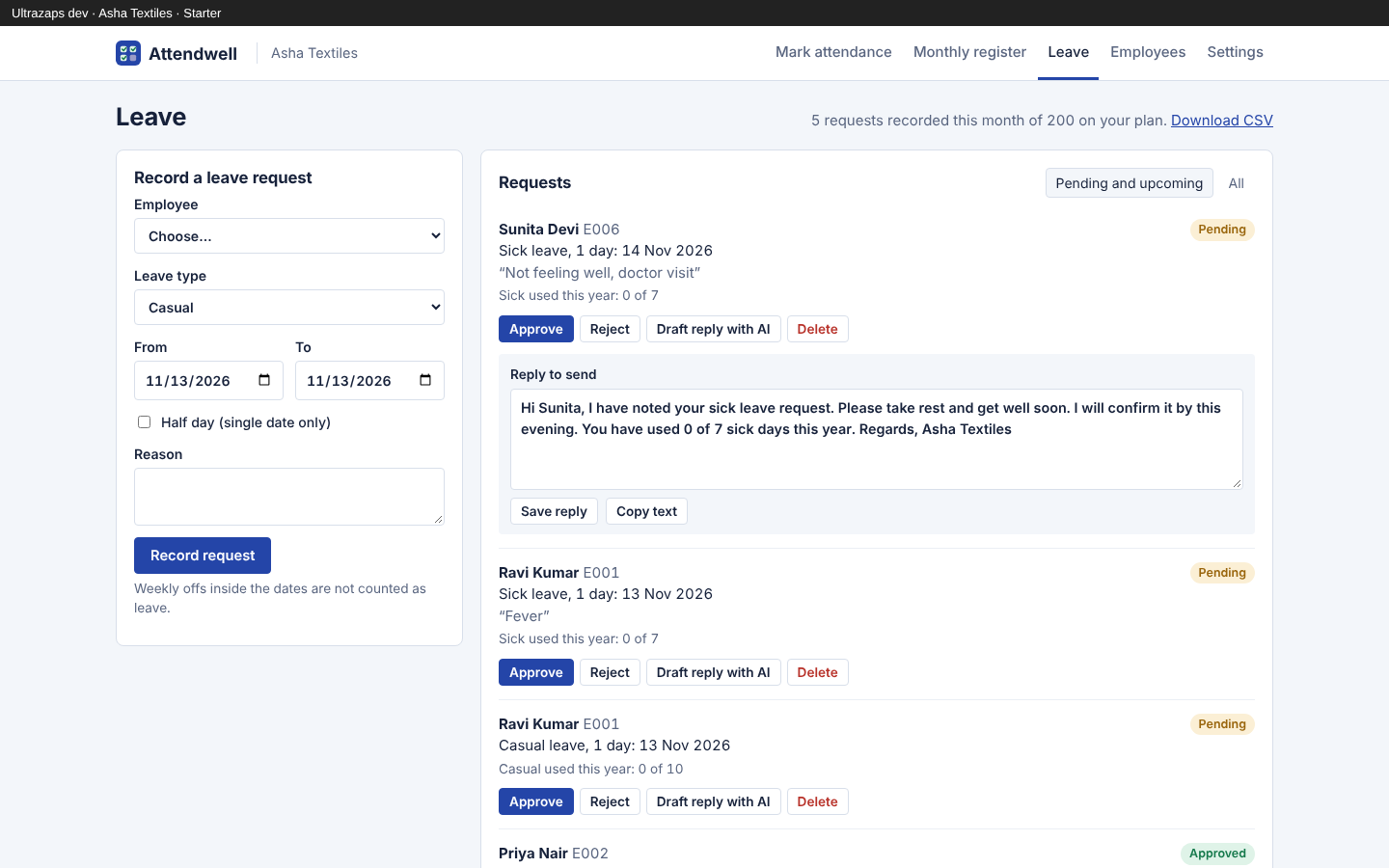
- Leave requests and approvals
- Record casual, sick, earned or unpaid leave, approve or reject it, and approved days are marked in the register automatically.
- Leave balances
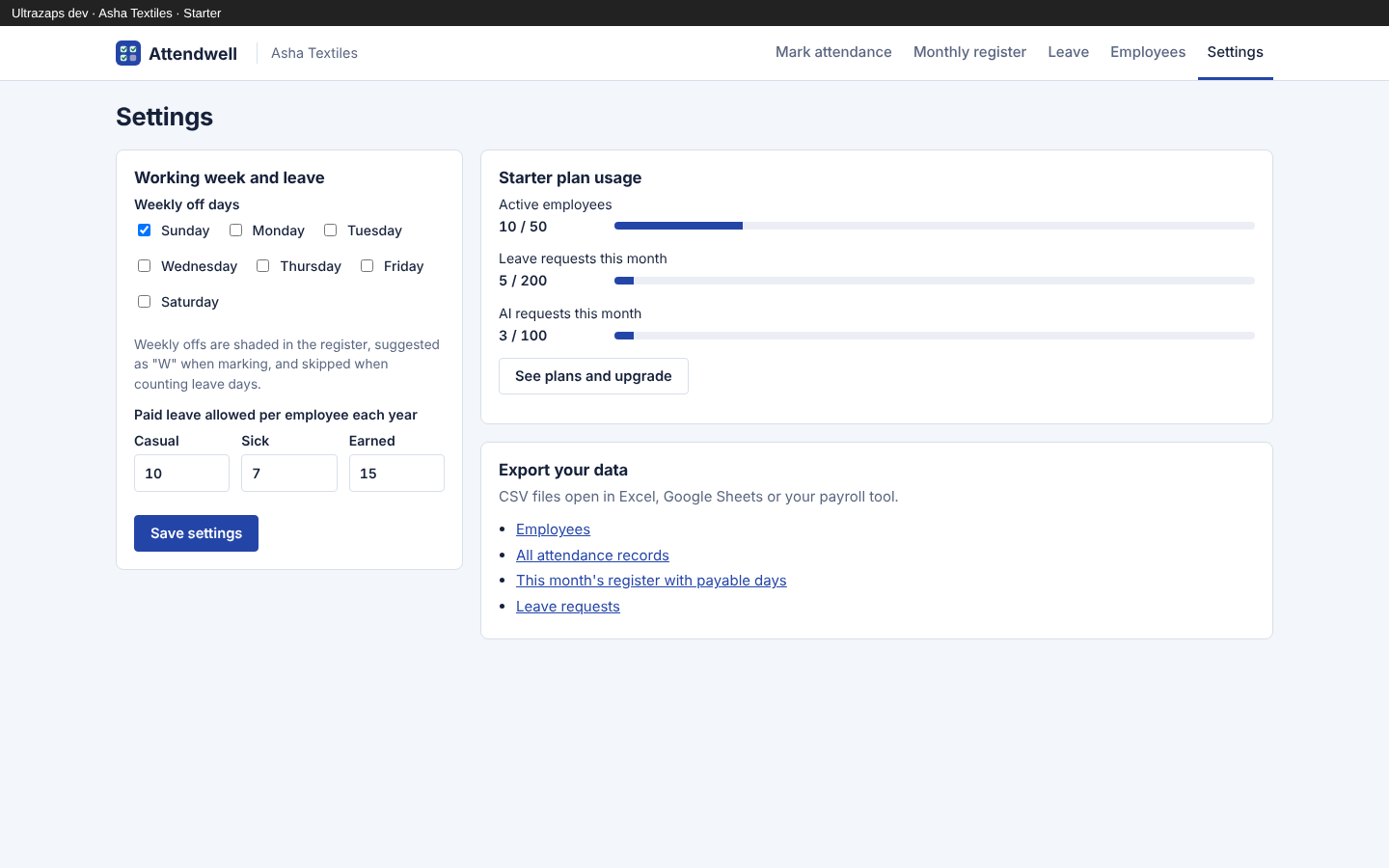
- Set yearly quotas for casual, sick and earned leave and see how much each person has used when you decide.
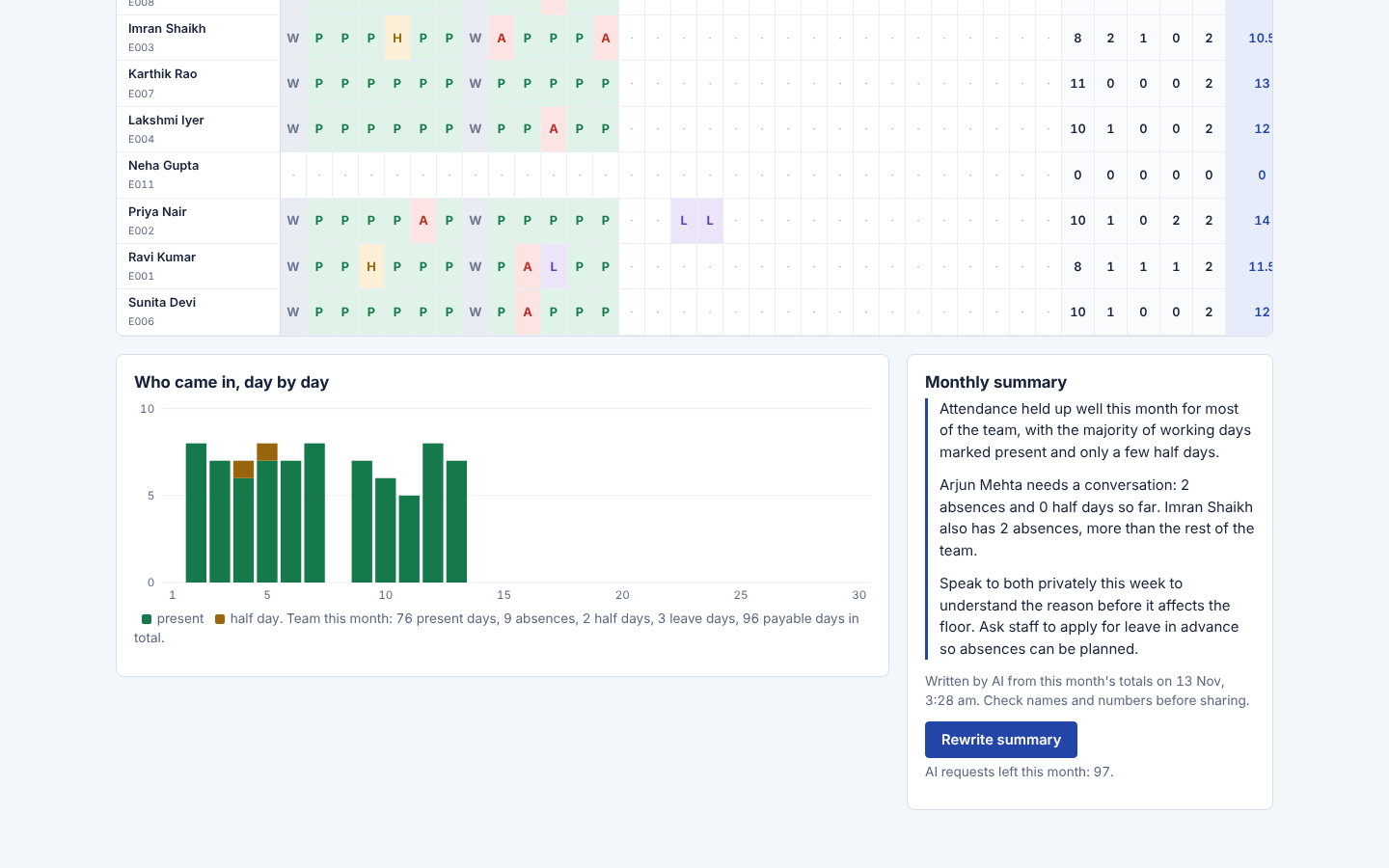
- AI monthly summary
- A short written review of the month that names who needs attention and suggests next steps, from your own totals.
- AI leave reply drafts
- A polite message to the employee about their request, with dates and remaining balance, ready to copy into WhatsApp.
- CSV export and print
- Download employees, attendance, leave and the monthly register as CSV, or print the register.
- Works on your phone
- Mark attendance from the shop floor on any mobile browser; the layout adapts down to small screens.
How it helps
Attendwell is an online attendance register for shops, clinics, offices and small factories. Each day you open the mark screen, tap Present, Absent, Half day, Leave or Week off for each person, and save. Keyboard shortcuts and a one-tap "mark the rest present" button keep it to under a minute for a team of twenty.
Leave requests are recorded with dates, type and reason. Weekly offs inside the dates are not counted, and each request shows how much of that leave type the employee has used this year against the quota you set. Approving a request marks those days in the register automatically, and unpaid leave is marked as absent.
The monthly register shows every employee and every day on one screen, with totals for present, absent, half days, leave and week offs, plus payable days for salary. A day-by-day chart shows how many people came in. The register prints cleanly and downloads as CSV for your payroll or accountant.
Two AI helpers work from your own records: a monthly summary that names who needs a conversation and spots patterns such as repeated Monday absences, and a reply draft for each leave request that mentions the dates and remaining balance, ready to paste into WhatsApp. Everything else works without AI.
Who uses it
- Retail shops and showrooms with counter and floor staff
- Clinics, diagnostic labs and pharmacies
- Small offices and agencies
- Small factories and workshops with daily-wage workers
- Restaurants and cloud kitchens
- Schools and coaching centres tracking staff attendance
Screens
Attendwell plans and limits
Prices in Indian rupees per month. Pay for 12 months and get 2 free. Paid plans do not renew on their own; when one ends, the app returns to free-plan limits and your data stays.
Free
Free
- Up to 10 active employees
- 15 leave requests a month
- 10 AI requests a month
- Monthly register, payable days and CSV export
Starter
₹299/month
- Up to 50 active employees
- 200 leave requests a month
- 100 AI requests a month
- Everything in Free
Pro
₹799/month
- Up to 300 active employees
- Unlimited leave requests
- 500 AI requests a month
- Everything in Starter
Questions about Attendwell
How much does Attendwell cost?
The Free plan costs nothing. Starter is ₹299 a month for up to 50 employees and Pro is ₹799 a month for up to 300 employees. You can upgrade or downgrade from your Ultrazaps account.
What do I get on the Free plan?
Up to 10 active employees, 15 leave requests a month and 10 AI requests a month, with the full register, payable days, CSV export and printing. There is no time limit.
Can my employees mark their own attendance?
Not in this version. The owner or manager signed in to the account marks attendance and records leave for the team.
How are payable days calculated?
Payable days are present days plus approved paid leave plus weekly offs plus half of each half day. Unpaid leave is marked as absent and is not counted.
Can I export my data?
Yes. Employees, every attendance record, leave requests and the monthly register with totals all download as CSV files that open in Excel or Google Sheets.
Does it work on mobile?
Yes. It runs in any modern phone browser, and the marking screen is designed for tapping on small screens. No app install is needed.
What happens when an employee leaves?
Mark them as left. Their past attendance stays in the register and exports, and they no longer count towards your plan's employee limit.