Staffline HR for Indian teams: jobs, people, leave, payroll and exits
Set up your head office, cost centres and departments, create jobs, hire candidates into them, and manage leave, holidays, payroll, tax declarations and exits. Statutory values are the ones you enter and confirm yourself.
What Staffline does
- Headquarters, cost centres and departments
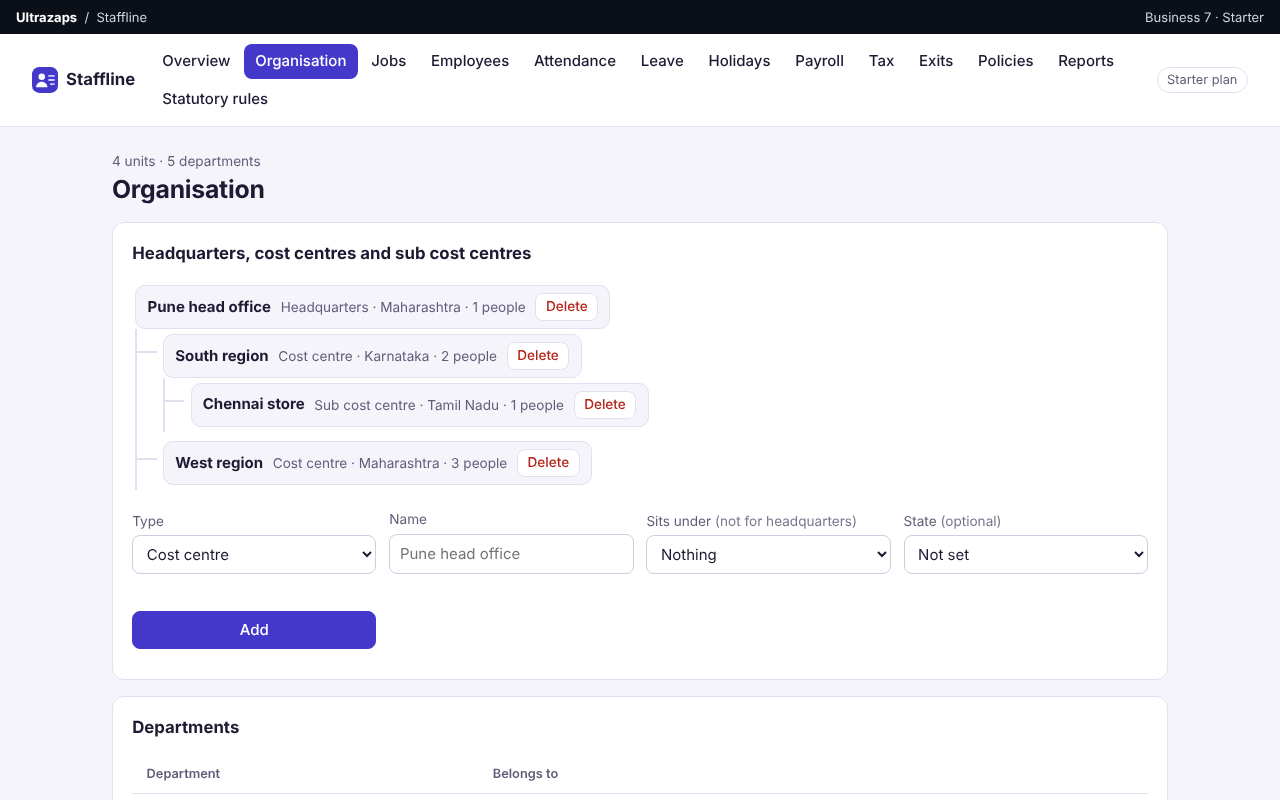
- Build your organisation as headquarters, cost centres and sub cost centres, each with a state, and add departments to the company or to a unit.
- Jobs before people
- Create a job with its department, cost centre and number of openings. Employees are added to a job, so vacancies are always known.
- Candidates, CVs and feedback
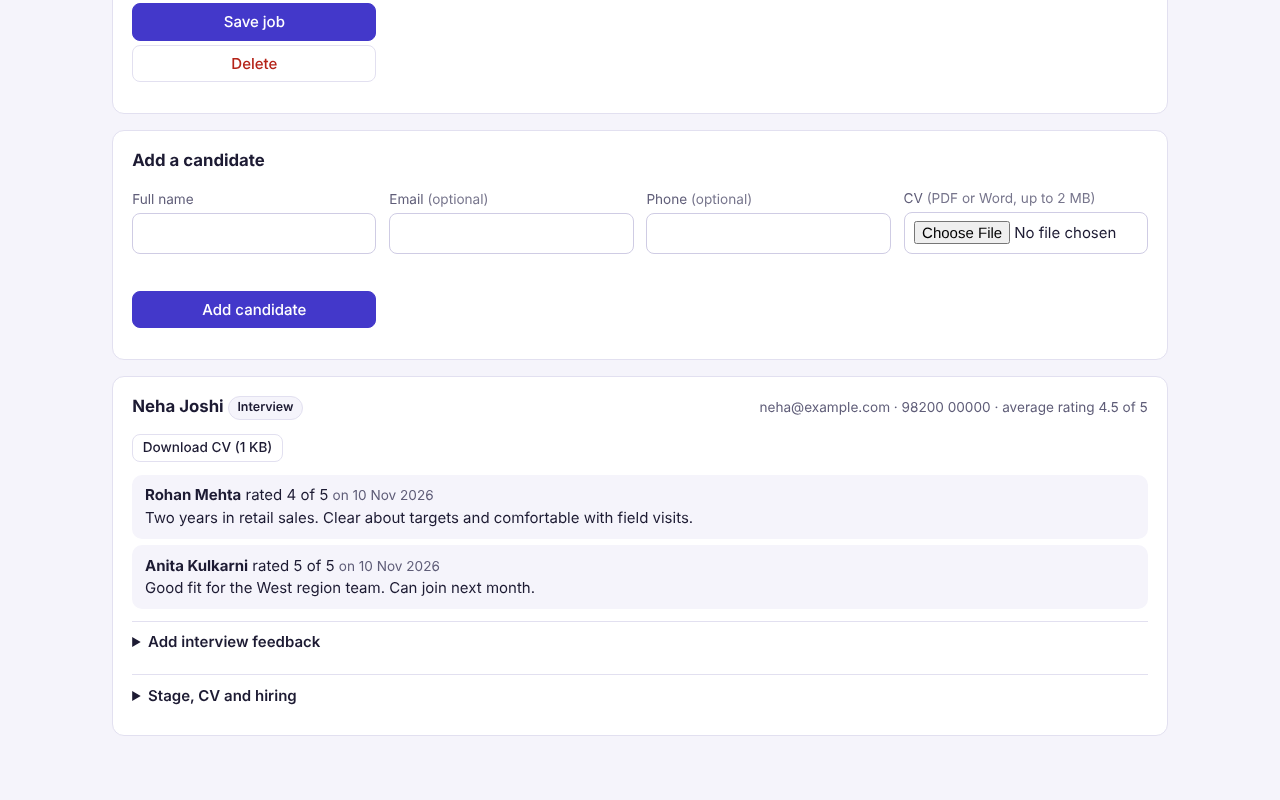
- Add candidates to a job, upload a CV as PDF or Word, record interview feedback with a rating, move them through stages and hire them in one step.
- Rules by state and cost centre
- Set leave allowances, weekly days off, holidays and policy documents for the whole company, one state or one cost centre. The most specific rule applies.
- Attendance and leave
- Record absences and half days, and approve leave against each person's allowance. Weekly offs and holidays that apply to the employee are not counted.
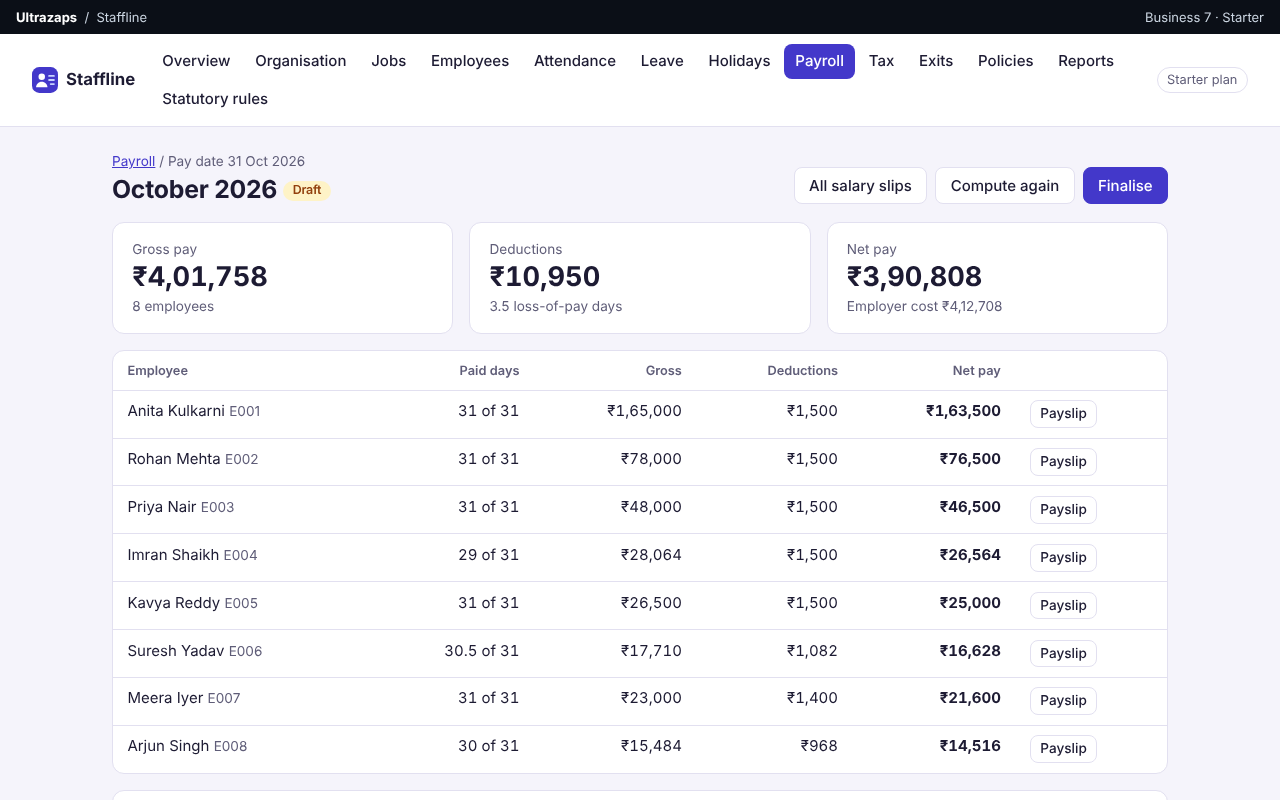
- Payroll and salary slips
- Compute monthly pay with pro-rating, one-time additions and deductions, then finalise it. Print one salary slip or all of them, and export the pay register.
- Statutory values you control
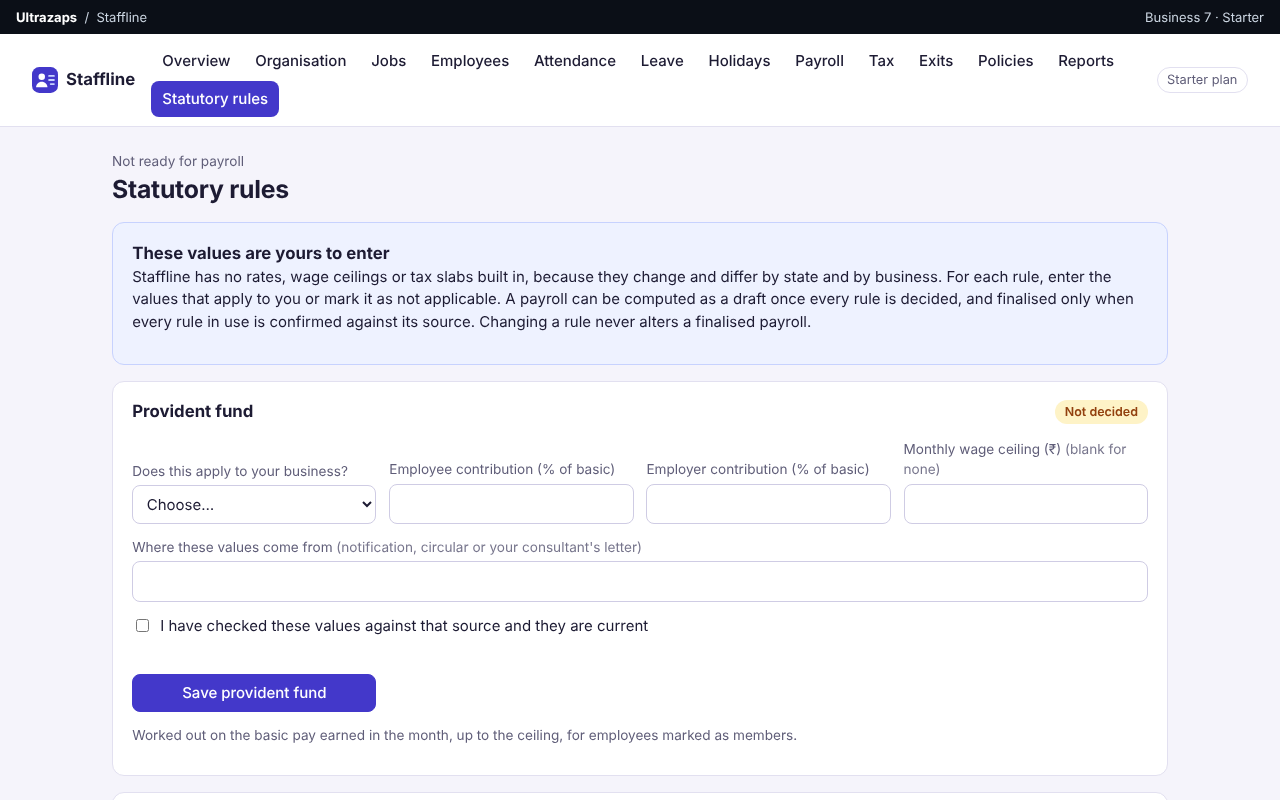
- Enter your own provident fund, state insurance and professional tax values with their source. Unconfirmed rules keep a payroll in draft.
- Tax declarations and Form 16 worksheet
- Keep each employee's regime choice and declared items for the financial year, and print a month-by-month statement of salary and tax deducted.
- Exit module
- Record the resignation date and last working day, work through an exit checklist, and complete the exit to mark the employee as left.
- Attrition, vacancy and tree reports
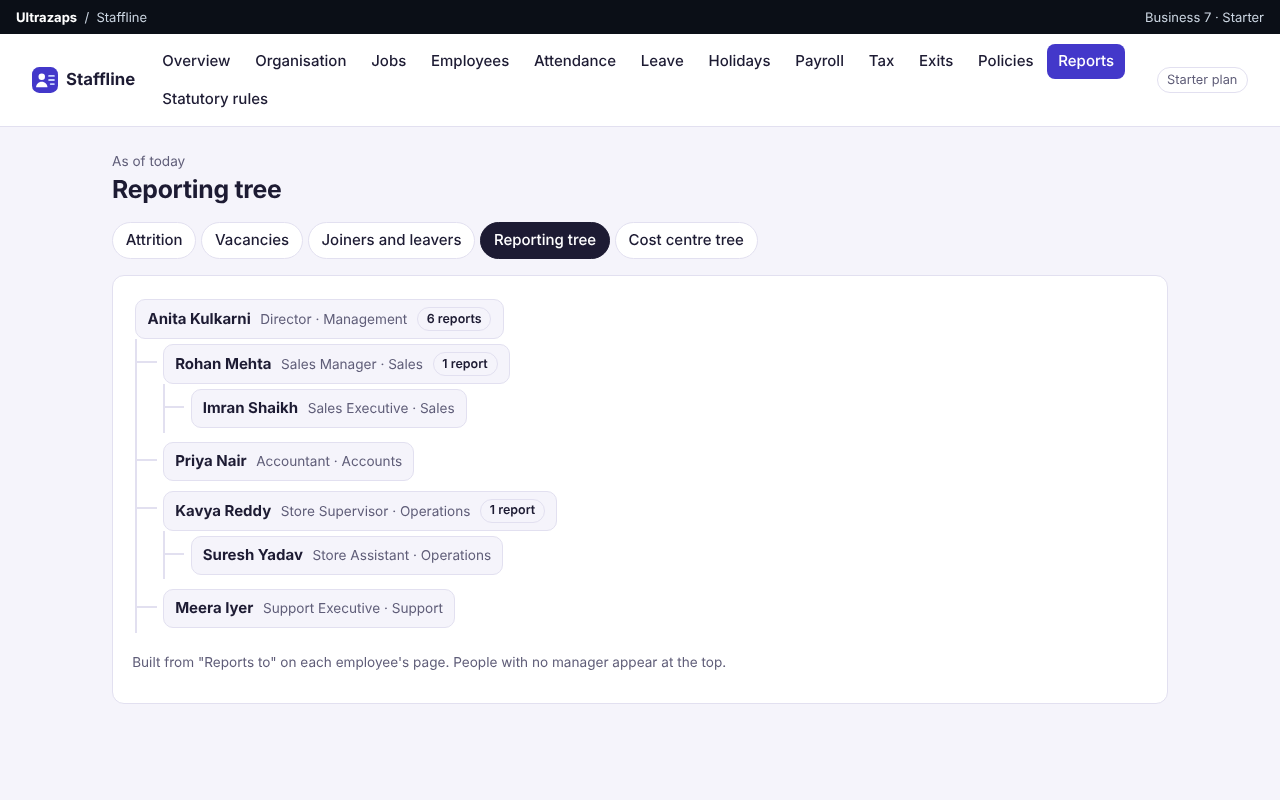
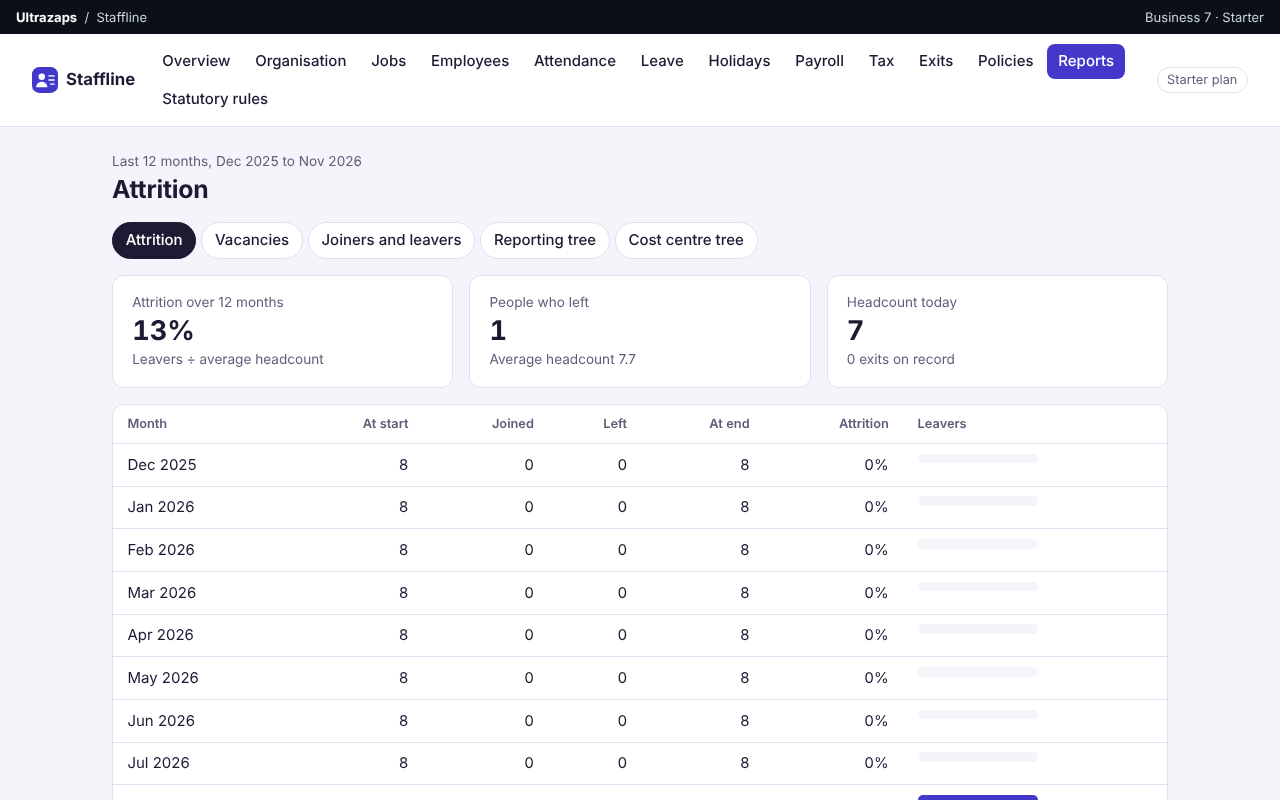
- See monthly attrition, vacancies by job, joiners and leavers with their dates, the reporting tree by manager and the cost centre tree with headcount and pay.
How it helps
Staffline is an HR and payroll app for small and growing businesses in India. Start with your organisation: headquarters, cost centres, sub cost centres and departments. Create jobs with a number of openings, add candidates with their CV and interview feedback, and hire them into the job. Every employee belongs to a job, a department, a cost centre and a manager.
Leave allowances, weekly days off, holidays and policy documents can be set for the whole company, for one state, or for one cost centre and everything under it. Record absences and half days, approve leave, keep each employee's tax declaration, and run exits with a resignation date, last working day and a checklist.
Each month Staffline works out pay from the salary, less absences and unpaid leave, and gives you a salary slip for every person, a pay register and a year's salary and tax worksheet to help prepare Form 16. Reports cover attrition, vacancies, joiners and leavers, the reporting tree and the cost centre tree.
Staffline does not come with statutory rates or a holiday list built in. You enter your own provident fund, state insurance and professional tax values and confirm them before a payroll can be finalised. Income tax is not calculated: you enter the monthly amount to deduct, and the official Form 16 still comes from the income tax portal.
Who uses it
- Shops and showrooms paying a small sales and store team each month
- Agencies and consultancies tracking leave and pay for office staff
- Clinics and coaching centres with a mix of full-time staff and new joiners
- Workshops and small factories recording absences and unpaid leave
- Startups that have outgrown a salary spreadsheet
- Accountants preparing monthly payslips for small clients
Screens
Staffline plans and limits
Prices in Indian rupees per month. Pay for 12 months and get 2 free. Paid plans do not renew on their own; when one ends, the app returns to free-plan limits and your data stays.
Free
Free
- Up to 5 employees
- 10 candidates with CVs
- 3 policy documents
- Organisation, jobs, leave, holidays and exits
- Monthly payroll, salary slips and reports
- 5 AI payroll reviews a month
Starter
₹499/month
- Up to 30 employees
- 100 candidates with CVs
- 20 policy documents
- Organisation, jobs, leave, holidays and exits
- Monthly payroll, salary slips and reports
- 50 AI payroll reviews a month
Pro
₹1,499/month
- Up to 300 employees
- 1000 candidates with CVs
- 200 policy documents
- Organisation, jobs, leave, holidays and exits
- Monthly payroll, salary slips and reports
- 300 AI payroll reviews a month
Questions about Staffline
How much does Staffline cost?
There is a free plan for up to 5 employees. Starter is ₹499 a month for up to 30 employees and Pro is ₹1,499 a month for up to 300 employees. Plans also differ in candidates, policy documents and AI reviews.
Why do I have to create a job before adding an employee?
A job holds the department, cost centre and number of openings. Adding each employee to a job is what lets Staffline show vacancies and keep the organisation tree correct. You can also hire a candidate straight into a job.
How do state and cost centre rules work?
Leave allowances, weekly days off, holidays and policy documents can be set for a state or a cost centre. For each employee the nearest rule applies: their own cost centre first, then the cost centres above it, then their state, then the company default.
Does Staffline know the current PF, ESI and professional tax rates or public holidays?
No. These change and differ by state, so none are built in. You enter the values and holidays that apply to you. A payroll cannot be finalised until every statutory rule in use is confirmed.
Does it generate Form 16?
It produces a worksheet for each employee and financial year: salary paid and tax deducted month by month from finalised payrolls, with their declaration. The official certificate is generated from the income tax department's portal, so use the worksheet to prepare and check it.
Does it calculate income tax or final settlement?
No. You enter the monthly income tax to deduct for each employee, and the exit module tracks dates and a checklist but does not calculate gratuity or final dues.
Where are CVs and policy documents kept, and can employees sign in?
Files are PDF or Word documents up to 2 MB, stored with your account and downloadable only when signed in to it. Staffline is used by the business owner or HR person; employees do not have their own sign-in yet.